Moving and hiding
Two runtime changes are not paint. ps2ui_visible_set takes a focus node's subtree out of the frame. ps2ui_offset_set moves everything the next frame draws.
What it is
The command list is baked. Layout ran at compile time, and the runtime replays a fixed list of records. So neither of these reflows anything.
Hiding is a bit per focus node. A hidden node's commands are skipped, its slots are skipped, and the D-pad walks past it. The rect it occupied stays empty. Use it for a row with no data behind it, a button an app turns off, a panel that is not available yet.
The offset is a translation added where coordinates reach the GS. Every command position moves, and so does every scissor a command pushed. The canvas rect does not, so content pushed far enough is clipped by the display. Use it for a scrolling region, a sliding panel, a carousel.
display: none is the compile-time alternative, and it does the opposite thing: the box is dropped before layout and the gap closes. Two compiles of one document, differing only by #b { display: none; }, show it.
ps2ui-layout: 4 paint commands, 3 focusables -> row.json
ps2ui-layout: 3 paint commands, 2 focusables -> row-none.json
In row.json the three tiles sit at x 40, 176 and 312. In row-none.json the third tile sits at x 176 and the middle one has no focus node at all.
Minimal example
Hide a row, ask about it, and put everything back.
ps2ui_visible_set(&ui, "row-5", 0);   /* stop painting row-5's subtree */
int shown = ps2ui_visible_get(&ui, "row-5");   /* 0 hidden, 1 shown, -1 unknown */
ps2ui_visible_reset(&ui);             /* every node in the blob, shown again */
Slide the next frame up sixty pixels.
ps2ui_offset_set(&ui, 0, -60);        /* PS2UI_OK, or PS2UI_ERR_RANGE */
ps2ui_offset_get(&ui, &dx, &dy);      /* read it back for your own art */
ps2ui_render(&ui, gs);                /* the translation applies here */
Both calls are cheap and take no GSGLOBAL. Neither schedules a transfer. Call them on a button press, not once per command.
Reference table
| function | effect | scope |
|---|---|---|
int ps2ui_visible_set(ps2ui_ctx *ctx, const char *name, int visible) |
Sets or clears the hidden bit for one focus node. Returns 1, or 0 when the current screen has no such name. | current screen |
int ps2ui_visible_get(const ps2ui_ctx *ctx, const char *name) |
Returns 1 shown, 0 hidden, PS2UI_VISIBLE_UNKNOWN for a name the current screen does not carry. |
current screen |
void ps2ui_visible_reset(ps2ui_ctx *ctx) |
Clears every hidden bit in the blob, on every screen. | whole blob |
int ps2ui_offset_set(ps2ui_ctx *ctx, int dx, int dy) |
Sets the draw-time translation. Returns PS2UI_OK, or PS2UI_ERR_RANGE outside int16. |
whole blob |
void ps2ui_offset_get(const ps2ui_ctx *ctx, int *dx, int *dy) |
Writes the current offset through either non-NULL pointer. |
whole blob |
The same five signatures, with their return conventions, are on the C API reference.
Behaviour
Visibility
The unit is a focus node's subtree, because that is the only grouping the baked command list carries. Every record and every slot stores the focus node it belongs to. The render loop tests that field twice, once over commands and once over slots. A hidden node loses its panel and its text together.
A run over the memcard blob hid save-ico on the saves screen, which owns the slot save-0.
Skipped records are counted rather than lost. stats.skipped_hidden and stats.slots_hidden carry them, described on Telemetry.
Names resolve inside the current screen's focus range. The memcard example has nav-games on both of its screens, and data-repeat makes two screens each using row-{i} the ordinary thing to author. A blob-wide scan would hide the wrong screen's node and report success. The same run asked the library screen about a saves-screen name.
ps2ui_visible_reset is the exception: it clears the whole bitmap, from whichever screen is current.
Hiding does not move focus. ps2ui_move skips a hidden node, so the D-pad cannot land on one, but ps2ui_focus_set still reaches it by name. That call is deliberate, and a caller that names a hidden node means it. Hide the row and move focus in the same breath if focus is sitting on it.
Lists drive this for you. ps2ui_list_apply_visibility hides the rows past the end of the data, covered on Lists.
The offset
New in 0.6.0. The runtime could change what was drawn and never where. The offset is the missing half, and it is a draw-time transform over records that already exist. No record, header field or format version changed for it. A blob baked by any 0.x toolchain renders where it always did, because a freshly loaded context starts at (0, 0).
The translation is added at the sink, where coordinates reach gsKit, not at the call sites that read a command's x. Textured and untextured primitives take it alike. So does the glyph pen, which derives its position from a slot entry rather than from a command. test_runtime.c asserts that every primitive in a frame moved by exactly the offset. That check caught an earlier version applying it in three places out of five.
A scissor pushed by a command takes the offset, because a panel's clip slides with the panel. The rect the scissor stack is seeded with does not, because it is the display edge. The result is that a frame slid past the edge is cut by the screen rather than drawn outside it.
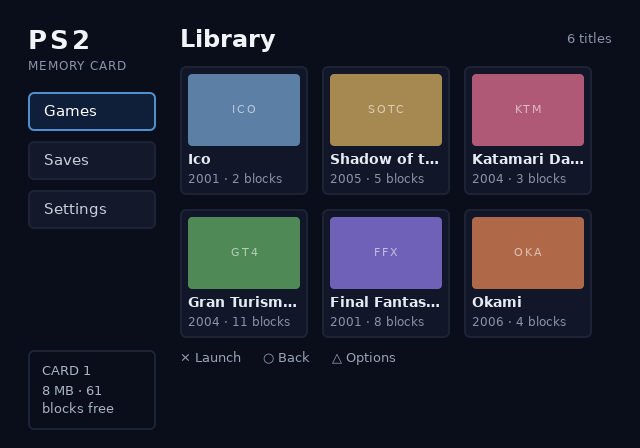
PYTHONPATH=packages/baker python3 -c "from ps2ui_bake.uib import read_uib; from ps2ui_bake import preview; preview.render(read_uib('examples/memcard/build/ui.uib'), screen='library', offset=(0, -60)).save('docs/site/assets/runtime/moving-and-hiding/offset-up.png')"
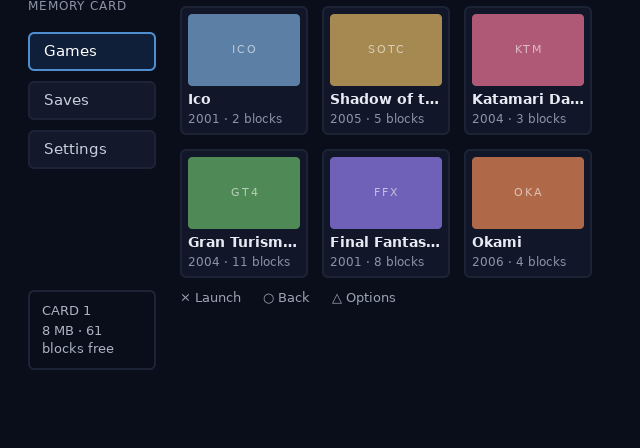
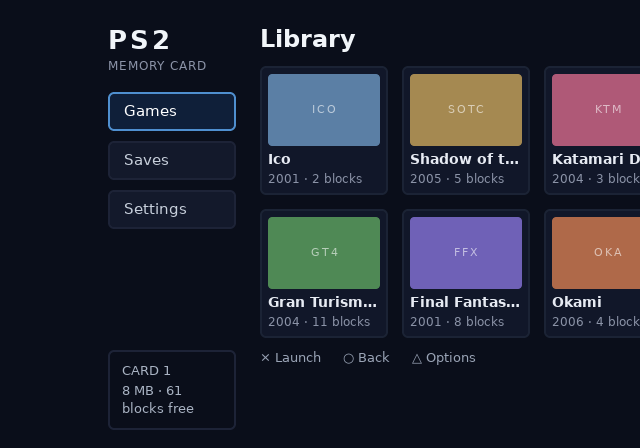
Geometry queries stay in UI coordinates, the coordinates the blob was authored in. The focused node's rect is read from ctx->focus_nodes[ctx->focus] and does not move with the offset. A host program read that rect either side of ps2ui_offset_set(&ui, 80, -60).
focus tile-okami rect at offset (0,0): x=464 y=209 w=128 h=129
focus tile-okami rect at offset (80,-60): x=464 y=209 w=128 h=129
An app that hit-tests against those numbers keeps working. An app drawing its own cursor over the UI adds the offset itself, from ps2ui_offset_get.
The two together
Hiding changes which records are submitted. The offset changes where the submitted ones land. They are independent, and a hidden node is hidden at every offset.
The offset also composes with ps2ui_render, which never clears. Set an offset, render the scrolling screen, set (0, 0), render the dialog. The dialog stays put while the page behind it moves. One frame of that, counted in the gsKit stub:
The compositing rules the second render obeys are on Screens and overlays.
Limits and errors
| symptom | cause | fix |
|---|---|---|
ps2ui_visible_set returns 0 |
The current screen has no focus node with that name. | Check the screen with ps2ui_screen_name, or the spelling against the compiler's focus names. |
ps2ui_visible_get returns -1 |
The same, reported as PS2UI_VISIBLE_UNKNOWN rather than as hidden. |
Distinguish the two before treating -1 as false. |
| A hidden row leaves a gap | Hiding keeps the node's space. Nothing reflows. | Use display: none at compile time when the gap must close. |
| Focus is on a node you just hid | visible_set does not move focus. |
Call ps2ui_focus_set or ps2ui_move after hiding. |
| A hidden node reappears | ps2ui_visible_reset cleared every bit in the blob. |
Re-hide after the reset, or hide and show by name instead. |
ps2ui_offset_set returns PS2UI_ERR_RANGE |
Either value is outside the int16 a command's own position uses. | Pass -32768 to 32767. The old offset is kept, so a refused call changes nothing. |
ps2ui_offset_set returns PS2UI_ERR_BOUNDS |
The context pointer is NULL. |
Load a context first. |
| Content vanishes at a large offset | The canvas scissor does not move, so the display clips it. | Clamp the offset to the range the screen can show. |
| The offset moves the frame and not a cursor an app draws | Queries answer in UI coordinates by design. | Add ps2ui_offset_get's values to your own coordinates. |
PS2UI_ERR_RANGE and the other codes are listed on Errors and constants.
The browser page draws neither of these. preview.render has no visibility parameter, so hiding is outside what the browser page shows. That boundary is stated in serve.py and described on Previewer.
The offset reaches one pen only. preview.render(uib, offset=(dx, dy)) is the host mirror of ps2ui_offset_set, down to refusing a value outside int16, and the three images above came from it. No command-line flag carries it: ps2ui serve --help and ps2ui-bake --help list none, and a served frame is always at (0, 0). Call preview.render directly to preview one.
Related pages
- C API reference for the signatures and their return conventions.
- Lists for
ps2ui_list_apply_visibilityand the row window. - Screens and overlays for a dialog drawn over a scrolled page.
- Previewer for what the browser page does and does not draw.
- Errors and constants for
PS2UI_ERR_RANGEandPS2UI_ERR_BOUNDS. - Telemetry for the counters hiding moves records into.