Tutorial: a game browser
Eight steps build UC-3: a title list on a CRT, driven by a D-pad, with row
text filled in at runtime. Every command below ran in this session, in
order, from an empty directory, and tools/check-tutorial.py runs the same
commands against this page.
1. Fonts of your own
ps2ui bakes text at build time. ps2ui-fontgen turns a TTF into the glyph
metrics the rest of the pipeline reads.
ps2ui-fontgen: 115 glyphs, 284 kern pairs -> fonts/default.metrics.json
ps2ui-fontgen: 115 glyphs, 163 kern pairs -> fonts/default-bold.metrics.json
ps2ui-fontgen: manifest -> fonts/fonts.json
Two faces, not a weight axis: font-weight: 600 and above resolves to
bold.
You now have fonts/fonts.json, naming both TTFs and their metrics.
Nothing downstream mentions fonts again.
2. The screen
One screen, six fixed rows, and the text each row will show left blank for the console to fill in.
cat > ui/library.html <<'EOF'
<screen name="library">
  <div class="page">
    <div class="header">
      <span class="title">Game Library</span>
      <span class="count" data-slot="count" data-slot-capacity="16">0 titles</span>
    </div>
    <div class="row" data-repeat="6" id="row-{i}" focusable>
      <span class="name" data-slot="name-{i}" data-slot-capacity="40">--</span>
      <span class="size" data-slot="size-{i}" data-slot-capacity="12">--</span>
    </div>
  </div>
</screen>
EOF
data-repeat="6" stamps six copies at compile time; see
Lists for the substitution rules. Each
data-slot reserves bytes the console fills at runtime, covered on
Dynamic text. focusable puts a
row in the D-pad graph the compiler solves at build time.
You now have a screen with a runtime concern, how many titles exist, deferred to step 8.
3. The style
Ordinary CSS, with var() reaching into a runtime-swappable tint table.
cat > ui/library.css <<'EOF'
:root {
  --bg: #10141f; --panel: #1a2030;
  --text: #e8ecf4; --dim: #a8b2c4; --accent: #2f6fd0;
}
.page   { display: flex; flex-direction: column; padding: 32px 40px; background: var(--bg); }
.header { display: flex; flex-direction: row; padding-bottom: 12px; }
.title  { font-size: 20px; font-weight: 700; color: var(--text); flex-grow: 1; }
.count  { font-size: 14px; color: var(--dim); }
.row    { display: flex; flex-direction: row; padding: 7px 10px; background: var(--panel); margin-bottom: 3px; }
.row:focus { background: var(--accent); }
.name   { font-size: 14px; color: var(--text); flex-grow: 1; }
.size   { font-size: 14px; color: var(--dim); }
.row:focus .size { color: var(--text); }
EOF
flex-direction is required on any container with two or more children.
Every var(--x) here becomes a role in the blob's tint table rather than a
fixed colour, the mechanism Theming
documents.
You now have colour a theme can move without re-baking geometry.
4. The project file
One file names the whole build.
cat > ps2ui.json <<'EOF'
{
  "screens": ["ui/library.html"],
  "css": "ui/library.css",
  "strict": true,
  "montage": "build/states.png"
}
EOF
screens and css are the only keys without a default; strict and
montage are already optional here.
The project file lists
every key ps2ui.json accepts and where each one resolves.
You now have a project file, with every other path resolved against its directory rather than the shell's working directory.
5. Build
Two stages turn the project into a blob.
ps2ui-layout: 14 paint commands, 6 focusables -> build/library.json
ps2ui-bake: 1 screen(s), 24 records, 2 textures (32 KiB baked), 1 CLUTs -> build/ui.uib
ps2ui-bake: arena 1516 bytes (static uint8_t arena[1516] __attribute__((aligned(16))))
ps2ui-bake: preview -> build/preview.png
ps2ui-bake: montage -> build/states.png
build/library.json is the intermediate representation: layout solved,
strings measured and kerned, the focus graph resolved. build/ui.uib is
what ships. The arena line is blob-specific: this six-row, thirteen-slot
project asks for 1516 bytes, a figure this bake produced, not a constant
copied from elsewhere.
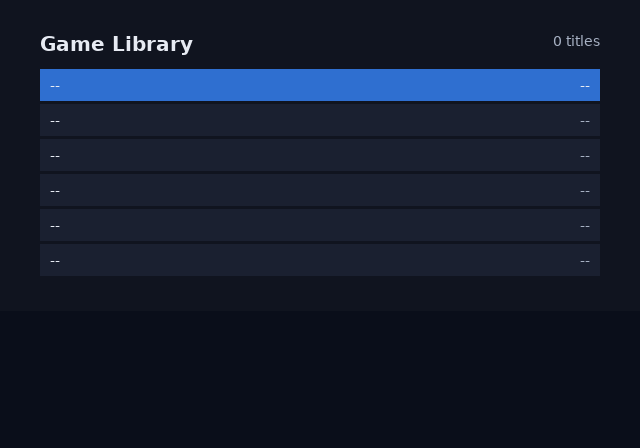
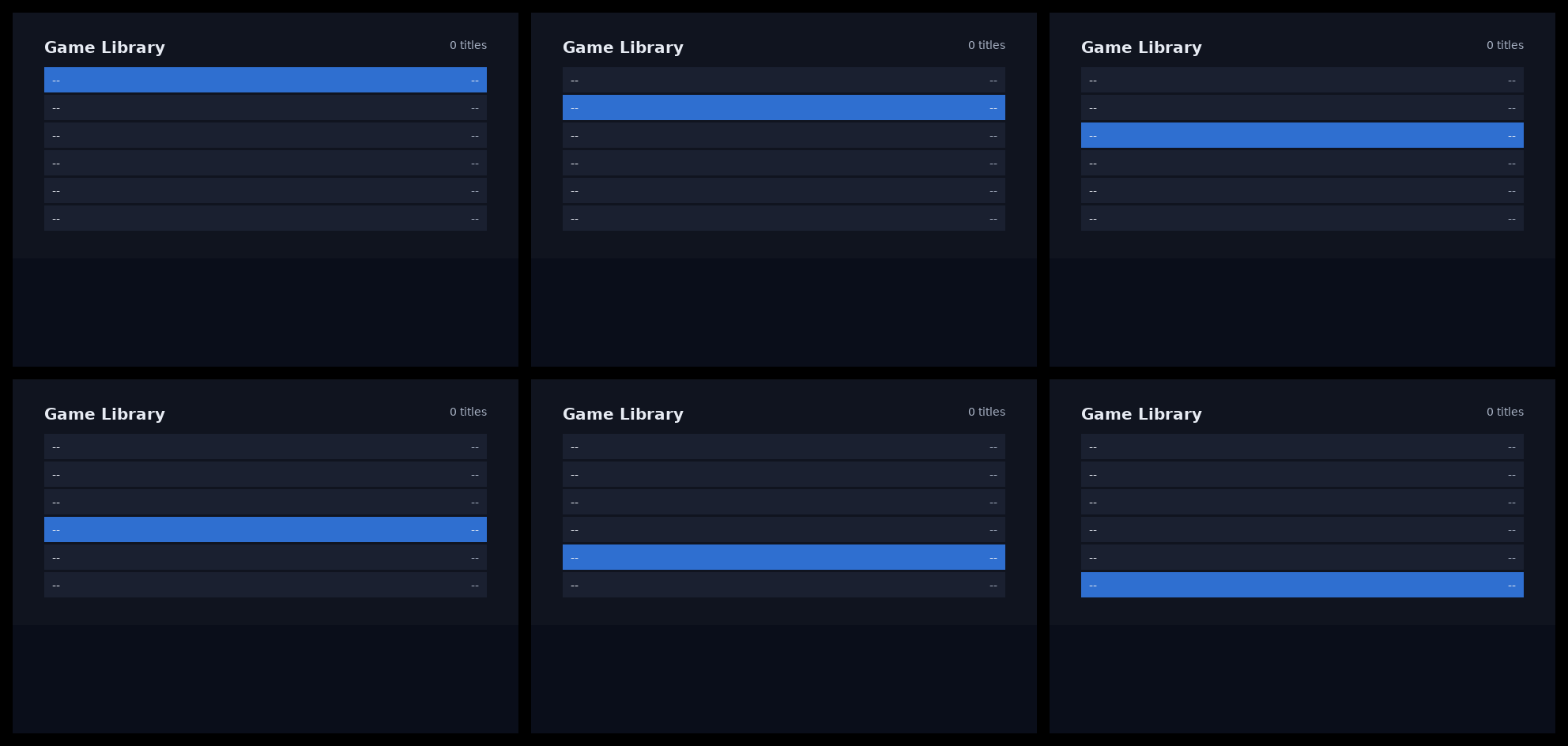
You now have a blob and two renders: one frame in preview.png, every
focus state in states.png.
6. Check it
The blob is checked against the same assumptions the C runtime makes.
# build/ui.uib: 640x448 at 4:3, 1 screen(s), 24 commands, 2 textures, 13 slots
PASS: 51 checks, 0 error(s), 0 warning(s)
ps2ui-check runs the same
check catalogue as the runtime's own load
checks: table bounds, texture residency, scissor depth, VRAM budget. It
never builds; a missing blob is a refusal.
You now have a blob proven against the runtime's assumptions, offline.
7. Look at it
The build serves itself, so a browser can confirm the frame it draws matches the one baked.
ok - an unknown route is 404
ok - the framebuffer frame is byte-identical to --preview
PASS: 6 route(s)
--selftest builds the project, binds an ephemeral port, and fetches
every route once. Its one load-bearing assertion: the served frame is
byte-identical to --preview. The command to type by hand is the same one
without the flag:
It reads ps2ui.json, prints the bound URL, and watches inputs. The
previewer shows the frame, the command
list, the focusables and the slot boxes; the browser draws no UI pixels of
its own.
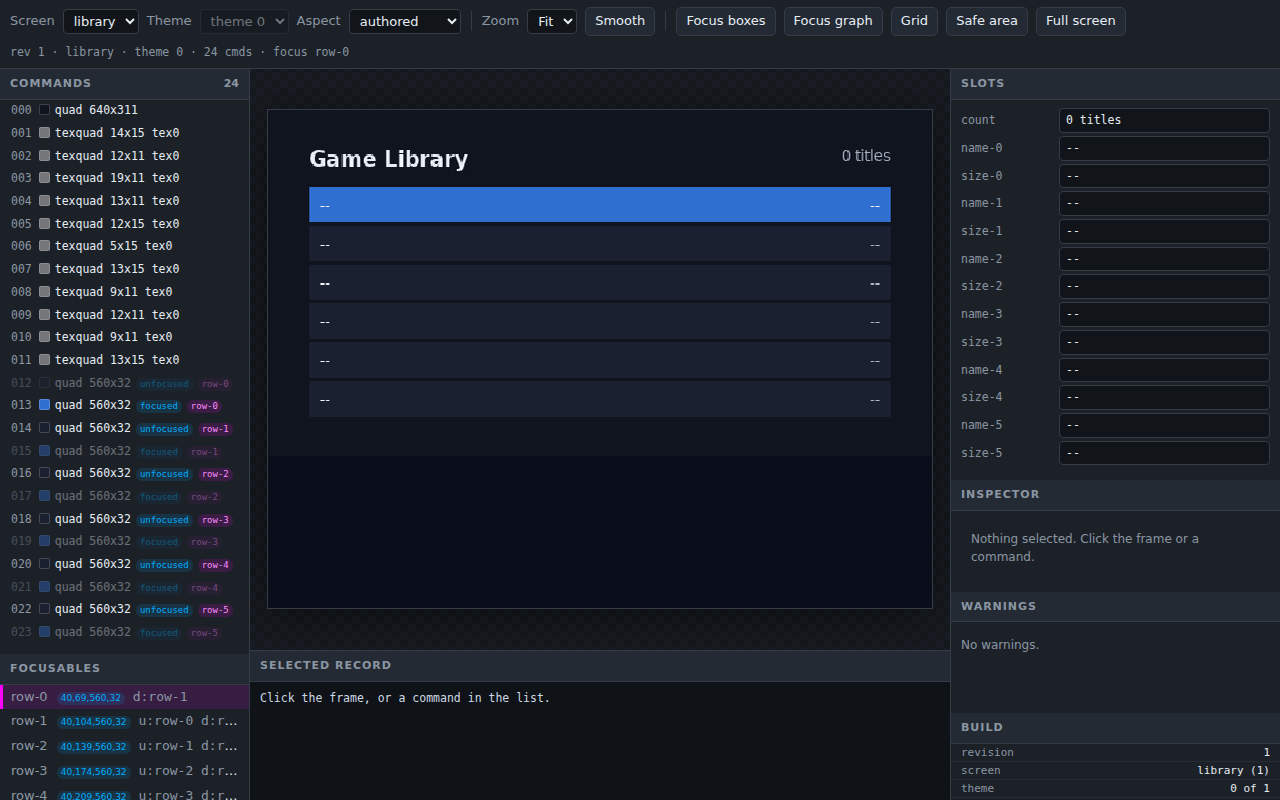
You now have a page that shows what the console will draw, checked
against the same render --preview writes.
8. Drive it from C
The runtime is one .c and one .h, vendored from the package rather
than a clone.
Compiling them needs a MIPS cross-toolchain, so the block below is not
sh: tools/check-tutorial.py has no Docker to run it against, and this
page does not claim otherwise.
The image ships gsKit off the include path, so a Makefile needs:
EE_CFLAGS  += -I$(PS2DEV)/gsKit/include -I$(PS2SDK)/ports/include
EE_LIBS     = -lgskit -ldmakit
EE_LDFLAGS += -L$(PS2DEV)/gsKit/lib -L$(PS2SDK)/ports/lib
Integrating the runtime covers the toolchain and a worked Makefile in full; the frame loop covers the ordering guarantees below.
The sample checks both calls against the arena this tutorial baked:
rc = ps2ui_load(&ui, ui_uib, size_ui_uib, arena, sizeof arena);
if (rc != PS2UI_OK) {
    while (1) {
        gsKit_clear(gs, GS_SETREG_RGBAQ(0x80, 0x00, 0x00, 0x80, 0x00));
        gsKit_queue_exec(gs);
        gsKit_sync_flip(gs);
    }
}
if (ps2ui_upload(&ui, gs) != 0) {
    while (1) {
        gsKit_clear(gs, GS_SETREG_RGBAQ(0x80, 0x80, 0x00, 0x80, 0x00));
        gsKit_queue_exec(gs);
        gsKit_sync_flip(gs);
    }
}
A refused load loops solid red; a refused upload loops solid yellow. Both
are fatal in runtime/sample/main.c, ahead of the per-frame loop.
The refill loop binds a list to the six baked rows:
ps2ui_list list;
ps2ui_list_init(&list, "row-", 6);
ps2ui_list_set_count(&ui, &list, n_games);

for (;;) {
    if (pad_down)  ps2ui_list_move(&ui, &list, +1);
    if (pad_up)    ps2ui_list_move(&ui, &list, -1);

    for (uint16_t r = 0; r < list.rows; r++) {
        int item = ps2ui_list_item_at(&list, r);
        char name[8];
        sprintf(name, "name-%u", r);
        ps2ui_slot_set(&ui, name, item < 0 ? "" : titles[item]);
    }
    ps2ui_slot_set(&ui, "count", count_text);

    ps2ui_render(&ui, gs);
    gsKit_queue_exec(gs); gsKit_sync_flip(gs);
    gsKit_TexManager_nextFrame(gs);
}
ps2ui_render never clears the frame. Two ps2ui_screen_set and
ps2ui_render pairs in one loop composite, and gsKit_TexManager_nextFrame
runs once after the flip, never between the two renders. ctx->stats
after a composited frame holds only the last render's counters.
You now have a refill loop where the runtime owns top, sel and focus,
and the app owns the data.
From a checkout
| command | checkout spelling |
|---|---|
ps2ui |
PYTHONPATH=<repo>/packages/baker python3 -m ps2ui_bake.ps2ui |
ps2ui-layout |
node <repo>/packages/layout/bin/ps2ui-layout.js |
ps2ui-dev |
node <repo>/packages/layout/bin/ps2ui-dev.js |
ps2ui-bake |
PYTHONPATH=<repo>/packages/baker python3 -m ps2ui_bake |
ps2ui-check |
PYTHONPATH=<repo>/packages/baker python3 -m ps2ui_bake.check |
ps2ui-fontgen |
PYTHONPATH=<repo>/packages/baker python3 -m ps2ui_bake.fontgen |
tools/check-tutorial.py puts these six names on PATH as shims onto
this tree. It runs this page the way it runs docs/tutorial-uc3.md, so
every command above stays true to the checkout.
Related pages
- Quick start runs the same eight commands with the checker's own transcript beside each one.
- ps2ui documents every subcommand and flag used above.
- The project file lists every key beyond the four used here.
- The frame loop covers load, upload and render in full, with every guarantee tabulated.